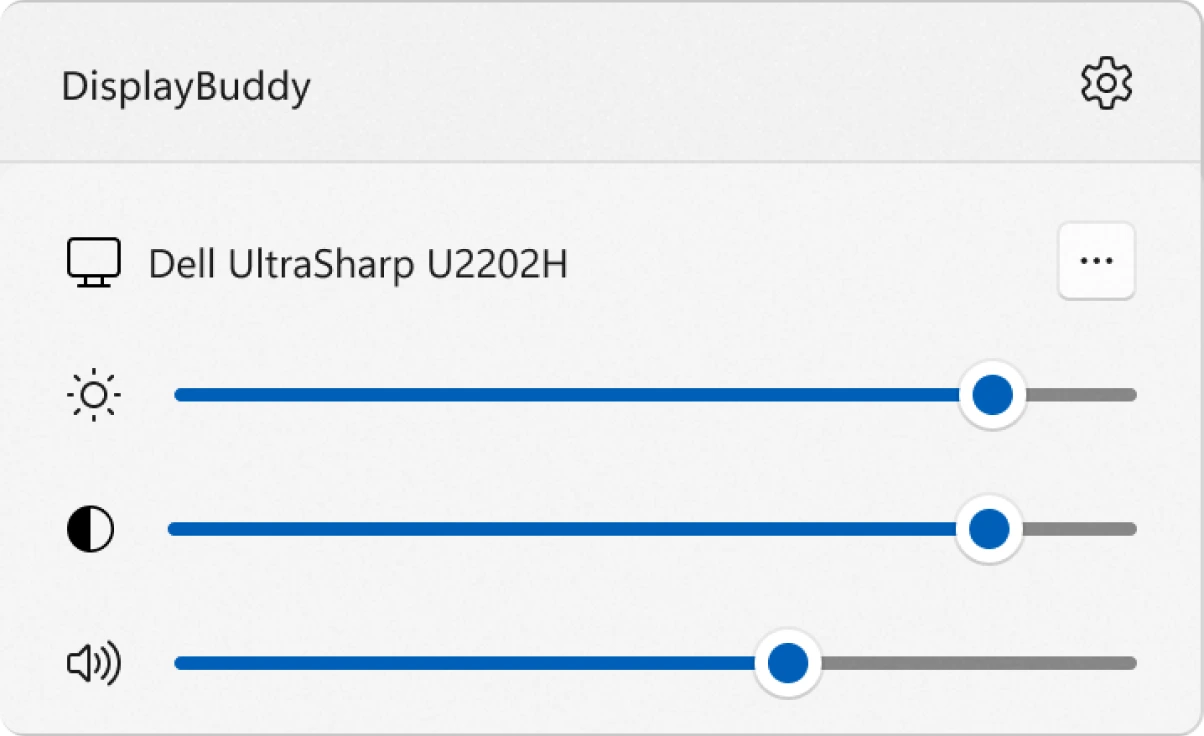
Microsoft PowerToys has long been the essential toolkit for maximizing productivity on Windows, offering features from the indispensable FancyZones to the robust PowerRename. Now, the development team is focusing on one of the most persistent frustrations for power users and multi-monitor enthusiasts: the awkward, manual adjustment of display settings.
The solution is an upcoming new module, currently referred to as Utility Monitor. This tool aims to centralize control over key monitor settings directly within the Windows environment, effectively replacing the need to fumble with physical On-Screen Display (OSD) buttons.
Introducing PowerToys Utility Monitor
The primary purpose of the Utility Monitor is to grant users effortless, system-level control over the physical properties of their connected displays. This is particularly beneficial for users running complex, asymmetrical multi-monitor setups.
Nielsen Laute, a Program Manager at Microsoft, recently shared early details of the project. The core functionality promises centralized adjustment capabilities for three key display settings:
- Brightness: Quickly adjust the display’s luminance level.
- Contrast: Fine-tune the color and light difference.
- Volume: Control the built-in speaker volume for monitors that support audio passthrough.
This unified control eliminates a major friction point. Instead of navigating individual OSD menus for brightness changes—a notoriously clunky process across different monitor brands—users can manage all settings from one simple PowerToys interface.
The Technical Requirement: Understanding DDC/CI
While the prospect of universal control is exciting, it comes with a critical technical prerequisite. The Utility Monitor feature, much like popular third-party alternatives such as TwinkleTray, relies on a technology called DDC/CI (Display Data Channel / Command Interface).
DDC/CI is the protocol that allows your computer’s operating system to “talk” to and control your monitor’s internal settings via the video cable (HDMI, DisplayPort, or USB-C).
Checklist for Monitor Compatibility:
For the PowerToys Utility Monitor to function correctly, your monitor must meet the following criteria:
- DDC/CI Support: The monitor’s hardware must be capable of receiving and executing commands via the DDC/CI protocol.
- Feature Activation: In many cases, DDC/CI functionality is disabled by default. You will need to check your monitor’s OSD menu and explicitly enable the DDC/CI setting.
If your display lacks this support, the feature will unfortunately not work, regardless of the PowerToys version you are running.
Why an Official Tool Matters for Productivity
The introduction of an official Microsoft utility is a significant step forward for desktop management. While community tools have proven the concept, an integrated PowerToys module offers superior benefits for Windows productivity:
- Enhanced Stability: Official integration generally leads to better reliability and fewer conflicts than third-party drivers or applications.
- Universal Interface: It provides a consistent user experience across different Windows installations and PowerToys updates.
- Integrated Deployment: Users gain access to the feature automatically through the familiar PowerToys update mechanism.
Availability and Rollout
The Utility Monitor is currently in the conceptual and early development phase, as publicly indicated by the Microsoft team.
While specific release dates are limited, the tool is expected to follow the typical PowerToys development cycle:
- Initial Development: Internal testing and refinement.
- PowerToys Preview: Release to the community for extensive testing and feedback (the most likely next step).
- Stable Channel: Final rollout in a future stable version of PowerToys, making it available to all Windows 10 and Windows 11 users.
Keep a close eye on the official PowerToys GitHub repository or wait for announcements for the next major PowerToys update. For power users burdened by OSD menus, this new module promises to be one of the most impactful Windows utility additions of the year.
Explore the Latest World of Technology.
Android
cross-device
file-explorer
phone-link
photos-tab
tech-news
windows-android
automation
bash-scripting
command-line
cron-jobs
file-permissions
linux-skills
terminal
vim
android-2026
android-security
apk-install
developer-verification
experienced-user
foss
google-play
open-source
sideloading
appimage